


こんにちは、UOZUです!
今回は、さくらのクラウド上に構築したUbuntuサーバーで「Ubuntu Pro」を利用してみます。
UbuntuをサーバーOSとして利用していると、長期間にわたってセキュリティアップデートを適用したいケースがあります。
Ubuntuには、通常のアップデートに加えて、より長期間のセキュリティメンテナンスなどを利用できる「Ubuntu Pro」が用意されています。
今回は、さくらのクラウドでUbuntuのサーバーを用意し、Ubuntu Proを利用するまでの流れを確認してみます。
Ubuntu Proとは
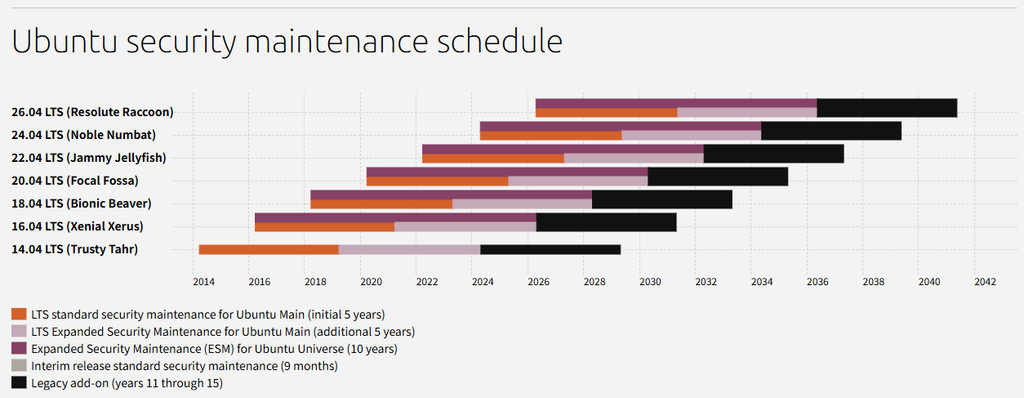
Ubuntu Proは、Ubuntuを長期間運用する際に利用できるサービスです。
通常のUbuntu環境でもセキュリティアップデートを利用できますが、Ubuntu Proを利用することで、標準のサポート範囲を超えてセキュリティメンテナンスを受けられるようになります。
特に、社内システムやWebサーバーなど、頻繁にOSの入れ替えができないサーバーでは、長期的にセキュリティアップデートを適用できることがメリットになります。
Ubuntu Proの状態を確認する
Ubuntu Proを利用する前に、現在の状態を確認してみます。
ログイン時に表示されるシステム情報を見ると、
Expanded Security Maintenance for Applications is not enabled.
というメッセージが表示されています。
$ ssh 203.0.113.244 -l ubuntu
Welcome to Ubuntu 26.04 LTS (GNU/Linux 7.0.0-14-generic x86_64)

 * Documentation:  https://docs.ubuntu.com
 * Management:     https://landscape.canonical.com
 * Support:        https://ubuntu.com/pro

 System information as of 2026年 8月 30日 日曜日 16:39:11 JST

  System load:  0.13               Processes:             106
  Usage of /:   10.3% of 18.25GB   Users logged in:       0
  Memory usage: 9%                 IPv4 address for ens3: 203.0.113.244
  Swap usage:   0%

Expanded Security Maintenance for Applications is not enabled.

0 updates can be applied immediately.

Enable ESM Apps to receive additional future security updates.
See https://ubuntu.com/esm or run: sudo pro status


The list of available updates is more than a week old.
To check for new updates run: sudo apt update


The programs included with the Ubuntu system are free software;
the exact distribution terms for each program are described in the
individual files in /usr/share/doc/*/copyright.

Ubuntu comes with ABSOLUTELY NO WARRANTY, to the extent permitted by
applicable law. -l ubuntu
Warning: Permanently added '133.125.237.244' (ECDSA) to the list of known hosts.
Welcome to Ubuntu 26.04 LTS (GNU/Linux 7.0.0-14-generic x86_64)

 * Documentation:  https://docs.ubuntu.com
 * Management:     https://landscape.canonical.com
 * Support:        https://ubuntu.com/pro

 System information as of 2026年 8月 30日 日曜日 16:39:11 JST

  System load:  0.13               Processes:             106
  Usage of /:   10.3% of 18.25GB   Users logged in:       0
  Memory usage: 9%                 IPv4 address for ens3: 133.125.237.244
  Swap usage:   0%

Expanded Security Maintenance for Applications is not enabled.

0 updates can be applied immediately.

Enable ESM Apps to receive additional future security updates.
See https://ubuntu.com/esm or run: sudo pro status


The list of available updates is more than a week old.
To check for new updates run: sudo apt update


The programs included with the Ubuntu system are free software;
the exact distribution terms for each program are described in the
individual files in /usr/share/doc/*/copyright.

Ubuntu comes with ABSOLUTELY NO WARRANTY, to the extent permitted by
applicable law.
というメッセージが表示されています。
これは、Ubuntu Proで提供される追加のセキュリティメンテナンスが、現在の環境では有効になっていないことを示しています。
また、Ubuntuでは以下のコマンドを利用してUbuntu Proの状態を確認できます。
$ sudo pro status
$ sudo pro status
SERVICE          AVAILABLE  DESCRIPTION
anbox-cloud      yes        Scalable Android in the cloud
esm-apps         yes        Expanded Security Maintenance for Applications
esm-infra        yes        Expanded Security Maintenance for Infrastructure
landscape        yes        Management and administration tool for Ubuntu
livepatch        yes        Canonical Livepatch service

For a list of all Ubuntu Pro services, run 'pro status --all'

This machine is not attached to an Ubuntu Pro subscription.
See https://ubuntu.com/pro
実際のログインメッセージでも、このコマンドを実行するよう案内されています。
Ubuntu Proを有効化する
Ubuntu Proを利用するには、Ubuntu Proの契約・登録を行ったうえで、対象のUbuntuサーバーをUbuntu Proへ接続します。
Ubuntu Proの登録は、Ubuntu公式サイトから行うことができます。
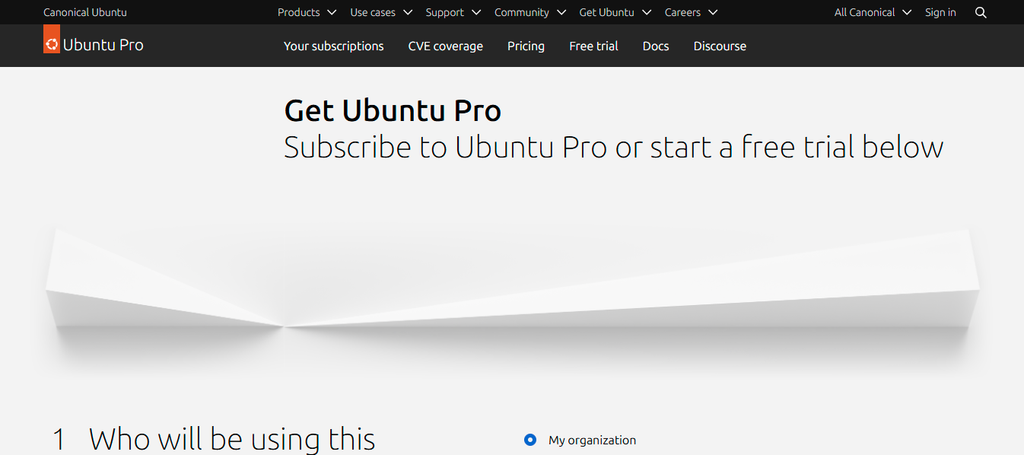
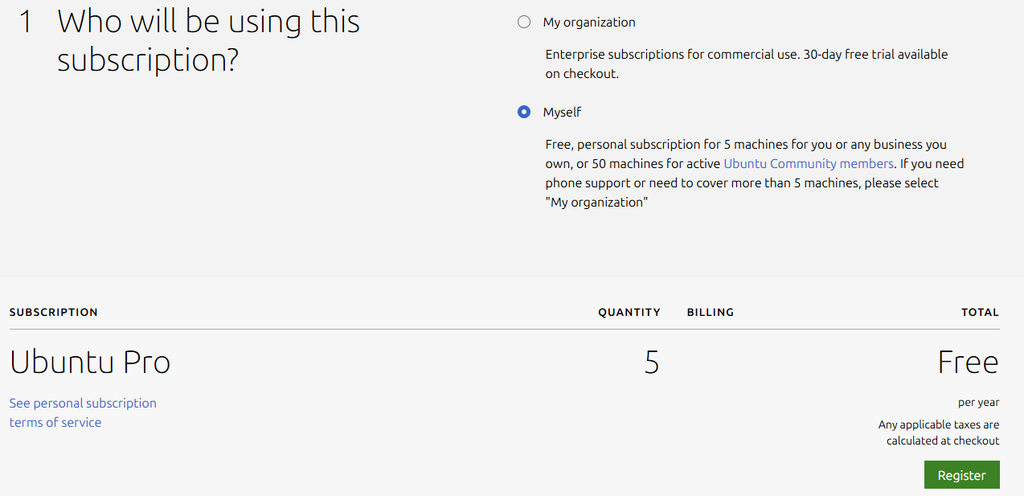
また、Ubuntu Proライセンスは個人または小規模な商用利用の際は5台までが無料になっています。
今回、検証の為の個人アカウントとして申請をしていきます。
アカウント発行までの流れ
サブスクリプションの申請画面から「MySelf」を選び、「Register」で登録画面に進みます。
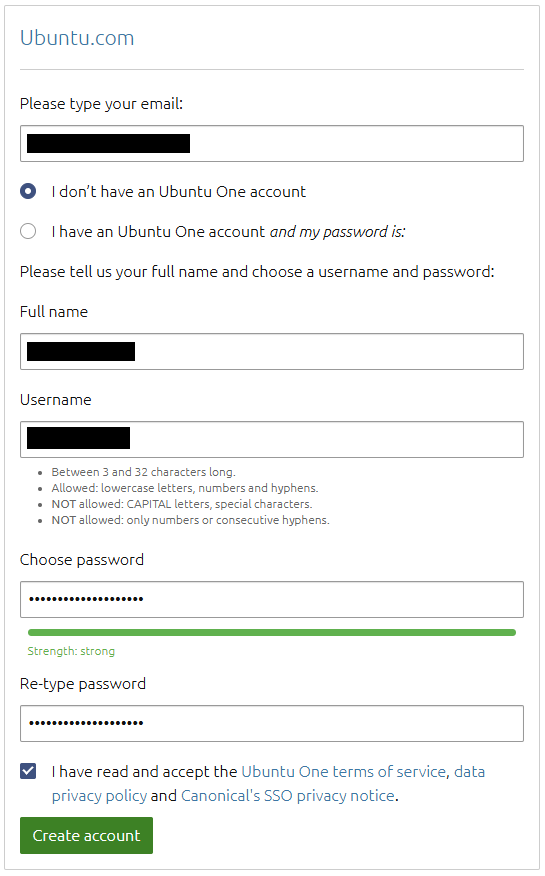
メーリングアドレス、フルネーム、希望するアカウント名、パスワードを設定し、「Create Accout」でアカウントが作成します。
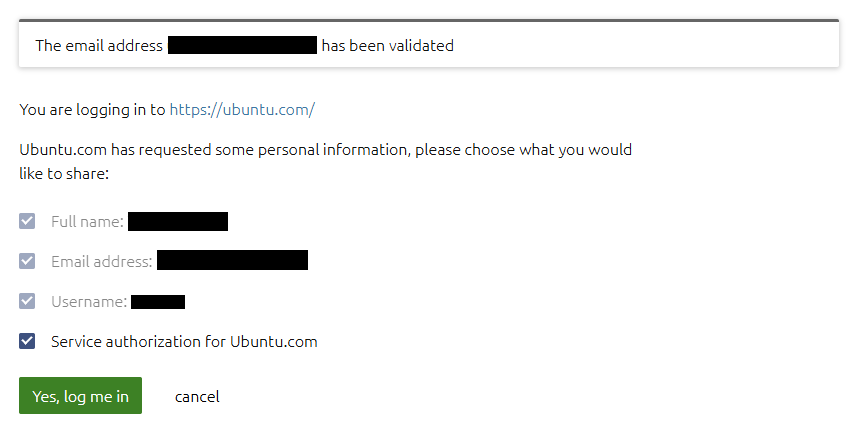
登録したメーリングアドレスまでメール検証の為の情報が届くので、URLをクリックしてメール検証を完了します。
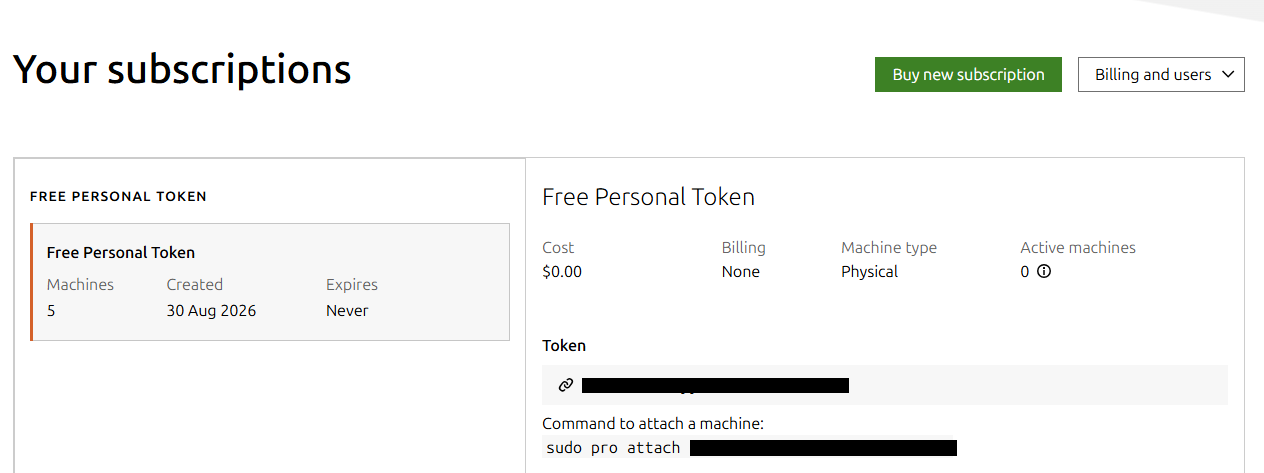
その後、「Your subscriptions」の画面から、ubuntu Pro に利用可能なトークン情報が確認出来るようになります。
Ubuntu Proを有効化
画面通り、sudo pro attach xxxxxxxxxxxxxxxxxxxxxxxxxxxxxx と、サーバー内でトークンを登録することで、Ubuntu Proが有効になります。
$ sudo pro attach xxxxxxxxxxxxxxxxxxxxxxxxxxxxxx
Enabling Ubuntu Pro: ESM Apps
Ubuntu Pro: ESM Apps enabled
Enabling Ubuntu Pro: ESM Infra
Ubuntu Pro: ESM Infra enabled
Enabling Livepatch
Livepatch enabled
This machine is now attached to 'Ubuntu Pro - free personal subscription'

SERVICE          ENTITLED  STATUS       DESCRIPTION
anbox-cloud      yes       disabled     Scalable Android in the cloud
esm-apps         yes       enabled      Expanded Security Maintenance for Applications
esm-infra        yes       enabled      Expanded Security Maintenance for Infrastructure
landscape        yes       disabled     Management and administration tool for Ubuntu
livepatch        yes       enabled      Canonical Livepatch service

NOTICES
Operation in progress: pro attach

For a list of all Ubuntu Pro services, run 'pro status --all'
Enable services with: pro enable <service>

     Account: xxx@netassist.ne.jp
Subscription: Ubuntu Pro - free personal subscription
Ubuntu Proを利用するメリット
サーバーを長期間運用する場合、OSのセキュリティアップデートを継続して適用できることは重要です。
特に、
- Webサーバー
- データベースサーバー
- 社内システム
- 長期間停止できない業務システム
などでは、OSのサポート期間を意識して運用する必要があります。
Ubuntu Proを利用することで、Ubuntuを長期運用する際の選択肢を広げることができます。
さいごに
今回は、さくらのクラウドでUbuntu Proを利用する方法について確認しました。
Ubuntu Proを利用することで、Ubuntuを長期間運用する際のセキュリティメンテナンスを強化できます。
今回の検証環境ではUbuntu 26.04 LTSを利用し、ログイン時にUbuntu Proの状態を確認しました。
さくらのクラウドでUbuntuを長期間運用する場合には、Ubuntu Proも選択肢の一つとして検討してみてはいかがでしょうか。
今回はここまでです。
最後まで読んでいただき、ありがとうございました!
この記事を書いた人