



こんにちは、UOZUです!
先の記事ではさくらのVPSでKUSANAGI 9の構築検証を実施してみました。
今回は、さくらのクラウド上にKUSANAGI 9環境を構築し、通常のAlmaLinux 9環境で構築したWordPressと比較して、どの程度パフォーマンスに差が出るのかを検証してみます。
ベンチマーク環境の用意
検証時点では、さくらのクラウドにおいてAlmaLinux 9版のKUSANAGI 9は未提供だったため、今回はCentOS Stream 9版のKUSANAGI 9を使用しています。
また、比較対象として、AlmaLinux 9上に通常構成のWordPress環境も構築しました。
| サーバ名 | uozu-kusanagi 9 | uozu-alma9 | uozu-perf |
| ドメイン名 | kusanagi.uozu | alma9.uozu | - |
| 用途 | KUSANAGI9 版WordPress | 通常版 WordPress | 計測用サーバ |
| ディスクイメージ | KUSANAGI 9.4 (CentOS Stream9 Edition) | AlmaLinux 9.7 64bit | AlmaLinux 10.1 64bit |
| プラン | 2Core-4GB | 2Core-4GB | 2Core-4GB |
| WordPress | 6.9.4 | 6.9.4 | - |
| WordPressテーマ | Twenty Twenty-Twoバージョン: 2.1 | Twenty Twenty-Twoバージョン: 2.1 | - |
| WEBサーバ | nginx/1.29.8 | nginx/1.20.1(OS標準) | - |
| PHP | PHP 8.3.30 | PHP 8.3.29(OS標準) | - |
| データベース | MariaDB 10.6.25 | MariaDB 10.5.29(OS標準) | - |
| ローカルIPアドレス | 192.168.0.4 | 192.168.0.5 | 192.168.0.6 |
できる限り外部ネットワークの影響を受けない条件で測定するため、ベンチマーク対象サーバと計測用サーバは、さくらのクラウドのスイッチを介して同一ローカルネットワーク内で接続しています。
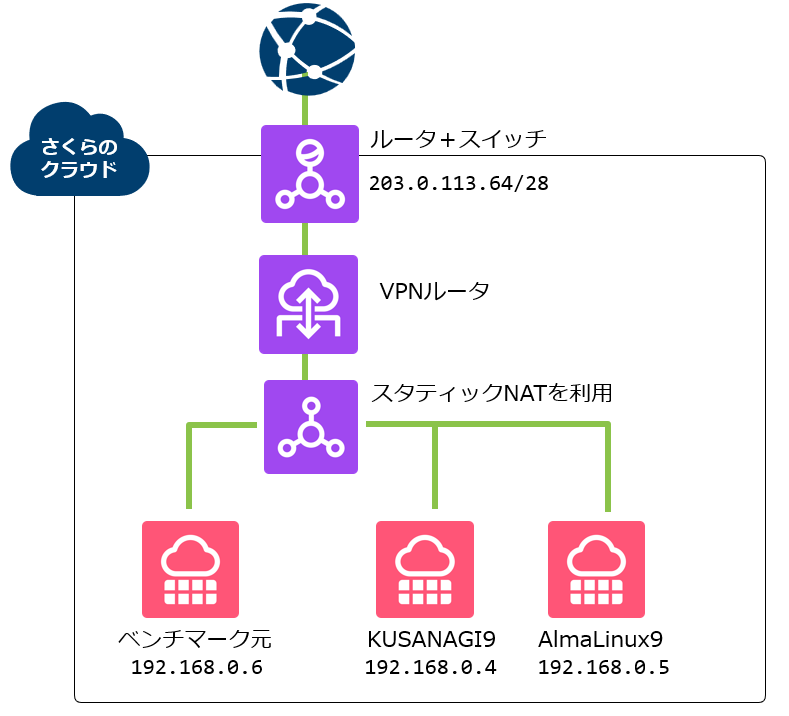
なお、今回使用したサーバプランはメモリ4GBのプランであるため、さくらのクラウドの仕様上、ローカルネットワークの通信速度は最大1.0Gbpsでの計測となります。
https://manual.sakura.ad.jp/cloud/support/technical/network.html#id6
Apacheベンチで計測
Apacheベンチの計測準備
ローカルネットワーク内での上限を測定したいので、計測用サーバにはhostsファイルに記入をします。
[root@uozu-perf ~]# vi /etc/hosts
-------------------------------------------------------------
192.168.0.4 kusanagi.uozu
192.168.0.5 alma9.uouzu
また、Apacheベンチのパッケージも入れておきます。
[root@uozu-perf ~]# dnf install httpd-tools -y
[root@uozu-perf ~]# which ab
/usr/bin/ab
リミットレートの解除
またKUSANAGI 9では標準で「リミットレート(短期間でのアクセス制限)」が設定されています。
[root@uozu-kusanagi9 ~]# less /etc/opt/kusanagi/nginx/nginx.conf
-------------------------------------------------------------
limit_req_zone $remote_addr$http_x_forwarded_for zone=one:10m rate=100r/s;[root@uozu-kusanagi9 ~]# less /etc/opt/kusanagi/nginx/conf.d/ratelimit.inc
-------------------------------------------------------------
limit_req zone=one burst=10 nodelay;
limit_req_status 429;リミットレートが有効なままではApacheベンチの際にアクセス制限し、エラー応答が発生する為、コメントアウトを行い、一時的に無効化します。
[root@uozu-kusanagi9 ~]# vi /etc/opt/kusanagi/nginx/nginx.conf
-------------------------------------------------------------
#limit_req_zone $remote_addr$http_x_forwarded_for zone=one:10m rate=100r/s;[root@uozu-kusanagi9 ~]# vi /etc/opt/kusanagi/nginx/conf.d/ratelimit.inc
#limit_req zone=one burst=10 nodelay;
#limit_req_status 429;コメントアウト後は、KUSANAGI 9のNginxをReloadし、設定内容を反映しておきます。
[root@uozu-kusanagi9 ~]# kusanagi nginx --test
nginx: the configuration file /etc/opt/kusanagi/nginx/nginx.conf syntax is ok
nginx: configuration file /etc/opt/kusanagi/nginx/nginx.conf test is successful
nginx completed.[root@uozu-kusanagi9 ~]# kusanagi nginx --reload
nginx: the configuration file /etc/opt/kusanagi/nginx/nginx.conf syntax is ok
nginx: configuration file /etc/opt/kusanagi/nginx/nginx.conf test is successful
nginx completed.100コネクション1000リクエスト
では100コネクション1000リクエストでApacheベンチを実行してみます。
KUSANAGI 9環境へのリクエスト結果
[root@uozu-perf ~]# ab  -c 100 -n 1000  https://kusanagi.uouzu/
This is ApacheBench, Version 2.3 <$Revision: 1923142 $>
Copyright 1996 Adam Twiss, Zeus Technology Ltd, http://www.zeustech.net/
Licensed to The Apache Software Foundation, http://www.apache.org/

Benchmarking kusanagi.uouzu (be patient)
Completed 100 requests
Completed 200 requests
Completed 300 requests
Completed 400 requests
Completed 500 requests
Completed 600 requests
Completed 700 requests
Completed 800 requests
Completed 900 requests
Completed 1000 requests
Finished 1000 requests


Server Software:        nginx
Server Hostname:        kusanagi.uouzu
Server Port:            443
SSL/TLS Protocol:       TLSv1.3,TLS_AES_256_GCM_SHA384,256,256
Server Temp Key:        X25519 253 bits
TLS Server Name:        kusanagi.uouzu

Document Path:          /
Document Length:        71114 bytes

Concurrency Level:      100
Time taken for tests:   20.312 seconds
Complete requests:      1000
Failed requests:        0
Total transferred:      71503000 bytes
HTML transferred:       71114000 bytes
Requests per second:    49.23 [#/sec] (mean)
Time per request:       2031.210 [ms] (mean)
Time per request:       20.312 [ms] (mean, across all concurrent requests)
Transfer rate:          3437.71 [Kbytes/sec] received

Connection Times (ms)
              min  mean[+/-sd] median   max
Connect:        1    7  16.0      2      76
Processing:   118 1965 386.6   2064    2812
Waiting:       36 1965 387.0   2064    2812
Total:        121 1972 375.7   2066    2814
AlmaLinux 9環境へのリクエスト結果
[root@uozu-perf ~]# ab  -c 100 -n 1000  https://alma9.uouzu/
This is ApacheBench, Version 2.3 <$Revision: 1923142 $>
Copyright 1996 Adam Twiss, Zeus Technology Ltd, http://www.zeustech.net/
Licensed to The Apache Software Foundation, http://www.apache.org/

Benchmarking alma9.uouzu (be patient)
Completed 100 requests
Completed 200 requests
Completed 300 requests
Completed 400 requests
Completed 500 requests
Completed 600 requests
Completed 700 requests
Completed 800 requests
Completed 900 requests
Completed 1000 requests
Finished 1000 requests


Server Software:        nginx/1.20.1
Server Hostname:        alma9.uouzu
Server Port:            443
SSL/TLS Protocol:       TLSv1.3,TLS_AES_256_GCM_SHA384,256,256
Server Temp Key:        X25519 253 bits
TLS Server Name:        alma9.uouzu

Document Path:          /
Document Length:        70686 bytes

Concurrency Level:      100
Time taken for tests:   29.989 seconds
Complete requests:      1000
Failed requests:        0
Total transferred:      70954000 bytes
HTML transferred:       70686000 bytes
Requests per second:    33.35 [#/sec] (mean)
Time per request:       2998.934 [ms] (mean)
Time per request:       29.989 [ms] (mean, across all concurrent requests)
Transfer rate:          2310.52 [Kbytes/sec] received

Connection Times (ms)
              min  mean[+/-sd] median   max
Connect:        1    6  14.2      2      67
Processing:   129 2904 436.2   2988    4046
Waiting:       56 2850 431.7   2931    3988
Total:        132 2910 429.3   2990    4047

Percentage of the requests served within a certain time (ms)
  50%   2990
  66%   3022
  75%   3044
  80%   3062
  90%   3130
  95%   3326
  98%   3534
  99%   3625
 100%   4047 (longest request)
100コネクション1000リクエスト3回分の平均値
チューニングを行っていないデフォルト構成でも、KUSANAGI 9環境は通常のAlmaLinux 9環境と比較して、約1.5倍のリクエスト処理性能を示しました。
| 項目 | KUSANAGI 9 平均 | AlmaLinux 9 平均 | 比較 |
| Document Length | 71,114 bytes | 70,686 bytes | ほぼ同等 |
| Concurrency Level | 100 | 100 | 同じ |
| Complete requests | 1000 | 1000 | 同じ |
| Failed requests | 0 | 0 | 同じ |
| テスト所要時間 | 20.158 秒 | 29.915 秒 | KUSANAGI 9が約9.757秒短い |
| Requests per second | 49.61 req/sec | 33.43 req/sec | KUSANAGI 9が約1.48倍 |
| Time per request | 20.158 ms | 29.915 ms | KUSANAGI 9が約9.757ms短い |
| Transfer rate | 3464.20 KB/sec | 2316.28 KB/sec | KUSANAGI 9が約1.50倍 |
| Total transferred | 71,503,000 bytes | 70,954,000 bytes | ほぼ同等 |
| HTML transferred | 71,114,000 bytes | 70,686,000 bytes | ほぼ同等 |
KUSANAGI 9のキャッシュ有効化
今度はシンプルなチューニングとして、KUSANAGI 9上でページキャッシュ機能「bcache」を有効にしてみます。
[root@uozu-kusanagi9 ~]# kusanagi bcache on kusanagi9
Turning bcache on.
bcache completed.[root@uozu-perf ~]# ab -c 100 -n 1000 https://kusanagi.uozu/
This is ApacheBench, Version 2.3 <$Revision: 1923142 $>
Copyright 1996 Adam Twiss, Zeus Technology Ltd, http://www.zeustech.net/
Licensed to The Apache Software Foundation, http://www.apache.org/
Benchmarking kusanagi.uouzu (be patient)
Completed 100 requests
Completed 200 requests
Completed 300 requests
Completed 400 requests
Completed 500 requests
Completed 600 requests
Completed 700 requests
Completed 800 requests
Completed 900 requests
Completed 1000 requests
Finished 1000 requests
Server Software: nginx
Server Hostname: kusanagi.uouzu
Server Port: 443
SSL/TLS Protocol: TLSv1.3,TLS_AES_256_GCM_SHA384,256,256
Server Temp Key: X25519 253 bits
TLS Server Name: kusanagi.uouzu
Document Path: /
Document Length: 71255 bytes
Concurrency Level: 100
Time taken for tests: 0.998 seconds
Complete requests: 1000
Failed requests: 0
Total transferred: 71643000 bytes
HTML transferred: 71255000 bytes
Requests per second: 1002.43 [#/sec] (mean)
Time per request: 99.757 [ms] (mean)
Time per request: 0.998 [ms] (mean, across all concurrent requests)
Transfer rate: 70134.01 [Kbytes/sec] received
Connection Times (ms)
min mean[+/-sd] median max
Connect: 2 24 10.3 22 71
Processing: 17 74 13.4 75 105
Waiting: 3 41 16.4 40 83
Total: 37 98 15.7 99 156
Percentage of the requests served within a certain time (ms)
50% 99
66% 103
75% 107
80% 109
90% 114
95% 119
98% 137
99% 152
100% 156 (longest request)改めてキャッシュ有効化後のベンチマークを3回行い、平均値で比較してみます。
| 項目 | KUSANAGI 9 キャッシュ有効化平均 | AlmaLinux 9 平均 | 比較 |
| Document Length | 71,255 bytes | 70,686 bytes | ほぼ同等 |
| Concurrency Level | 100 | 100 | 同じ |
| Complete requests | 1000 | 1000 | 同じ |
| Failed requests | 0 | 0 | 同じ |
| テスト所要時間 | 1.038 秒 | 29.915 秒 | KUSANAGI 9が約28.877秒短い |
| Requests per second | 965.83 req/sec | 33.43 req/sec | KUSANAGI 9が約28.89倍 |
| Time per request | 1.038 ms | 29.915 ms | KUSANAGI 9が約28.877ms短い |
| Transfer rate | 67,573.24 KB/sec | 2316.28 KB/sec | KUSANAGI 9が約29.17倍 |
| Total transferred | 71,643,000 bytes | 70,954,000 bytes | ほぼ同等 |
| HTML transferred | 71,255,000 bytes | 70,686,000 bytes | ほぼ同等 |
キャッシュ有効化で、かなり大きな効果が確認できました。
KUSANAGI 9の公式サイトでは、キャッシュ機能「bcache」はWordPress/PHP側でキャッシュを持たせる事により、より高速にページが表示出来るとされています。イメージとしては、以下の様な形でキャッシュを保持してる、と推定しています。
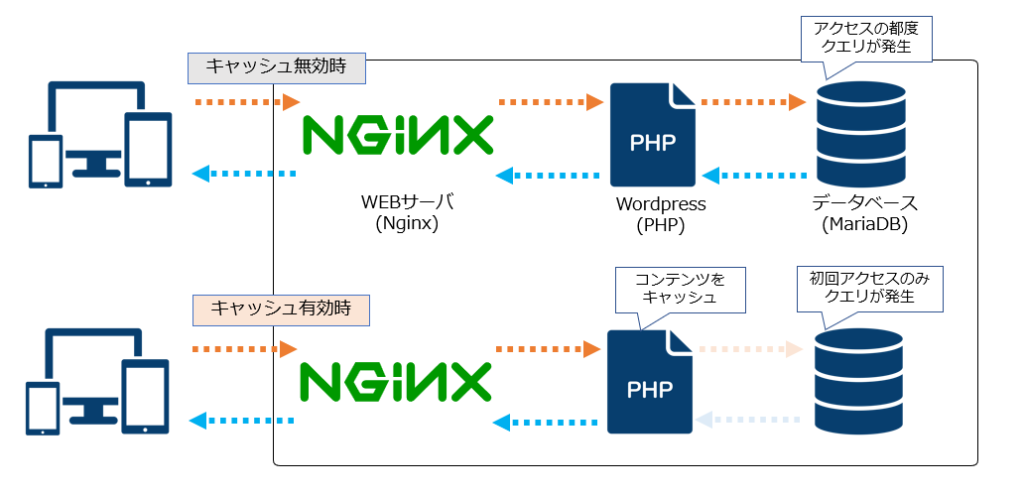
コマンドラインからのキャッシュ有効後、Wordpressの管理画面からキャッシュ時間の調整やキャッシュクリアも出来る様ですね。
https://kusanagi.tokyo/column/archives/column_7193
HTTP/3アクセスに関する補足
また、KUSANAGI 9のnginx設定において今回確認した環境では、、HTTP/3を利用できる設定があらかじめ含まれていました。
[root@uozu-kusanagi9 ~]# less /etc/opt/kusanagi/nginx/conf.d/ssl_listen.inc
-------------------------------------------------------------
listen 443 ssl;
listen [::]:443 ssl;
http2 on;
listen 443 quic;
listen [::]:443 quic;
more_set_headers 'Alt-Svc: h3=":443"; ma=2592000';[root@uozu-kusanagi9 ~]# ss -tnlu '( sport = 443 or sport = 80 )'
Netid State Recv-Q Send-Q Local Address:Port Peer Address:Port
udp UNCONN 0 0 0.0.0.0:443 0.0.0.0:*
udp UNCONN 0 0 0.0.0.0:443 0.0.0.0:*
udp UNCONN 0 0 [::]:443 [::]:*
udp UNCONN 0 0 [::]:443 [::]:*
tcp LISTEN 0 511 0.0.0.0:80 0.0.0.0:*
tcp LISTEN 0 511 0.0.0.0:443 0.0.0.0:*
tcp LISTEN 0 511 [::]:80 [::]:*
tcp LISTEN 0 511 [::]:443 [::]:*初期状態ではHTTP/HTTPSの通信は許可されていますが、HTTP/3を利用する場合は、必要に応じてUDP 443番ポートの許可設定を追加してください。
[root@uozu-kusanagi9 ~]# firewall-cmd --list-all
public (active)
  target: default
  icmp-block-inversion: no
  interfaces: eth0
  sources:
  services: cockpit dhcpv6-client http https ssh
  ports:
  protocols:
  forward: yes
  masquerade: no
  forward-ports:
  source-ports:
  icmp-blocks:
  rich rules:
[root@uozu-kusanagi9 ~]# firewall-cmd --add-port=443/udp --permanent
success
[root@uozu-kusanagi9 ~]# firewall-cmd --reload
success
[root@uozu-kusanagi9 ~]# firewall-cmd --list-all
public (active)
  target: default
  icmp-block-inversion: no
  interfaces: eth0
  sources:
  services: cockpit dhcpv6-client http https ssh
  ports: 443/udp
  protocols:
  forward: yes
  masquerade: no
  forward-ports:
  source-ports:
  icmp-blocks:
  rich rules:
NginxとHTTP/3はについては、テックブログの方でも触れていますので、併せてご覧いただけますと幸いです。
https://www.netassist.ne.jp/techblog/35930/
さいごに
今回は、さくらのクラウド上にKUSANAGI 9環境と通常構成のWordPress環境を用意し、Apache Benchを用いてパフォーマンスを比較しました。
さくらのクラウド上でWordPress環境を構築する際、KUSANAGI 9は高速なWordPress実行環境の有力な選択肢になりそうです。特に、ページキャッシュを有効化した場合には大きな性能向上が確認できました。
さくらのクラウドでWordPressサイトの構築や高速化を検討されている方の参考になれば幸いです。。
この記事を書いた人