



こんにちは、UOZUです!
エンハンスドロードバランサの仕様が6月22日から変更されるとの予告が出ていた為、現在の仕様を確認しつつ、変更後も確認してみようと思います。
https://cloud.sakura.ad.jp/news/2026/06/11/enhanced-load-balancer-specification-change
検証環境の用意
まずは現在の状況を確認する為、以下の様な2系統のアクセスが可能な検証環境を用意しました。
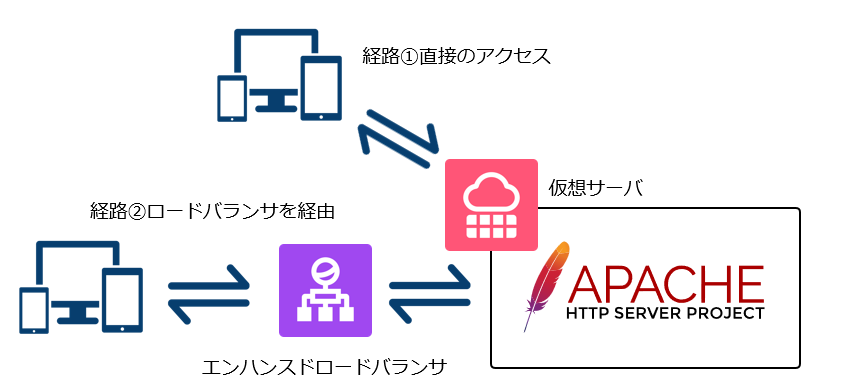
経路①は仮想サーバへの直接のアクセス、経路②はエンハンスドロードバランサを経由したアクセスです。
また、検証の際のIPアドレスは以下としています。
| クライアントIP | 198.51.100.100 |
| 仮想サーバIP | 203.0.113.10 |
| エンハンスドロードバランサVIP | 203.0.113.20 |
| (プロキシ元ネットワーク) | 203.0.113.96/27 |
経路①仮想サーバへの直接のアクセス時
クライアント側からはシンプルにcURLコマンドでアクセスし、サーバ側ではssコマンドで見てみます。
何度かcURLを実行し、サーバ内の接続状況を確認します。
[uozu@client ~]$ curl -I http://203.0.113.10/
HTTP/1.1 200 OK
Date: Sun, 14 Jun 2026 07:36:39 GMT
Server: Apache
Last-Modified: Fri, 27 Mar 2026 10:06:55 GMT
ETag: "3-64dfea928c7a8"
Accept-Ranges: bytes
Content-Length: 3
Content-Type: text/html; charset=UTF-8[root@web ~]# ss -tna '( sport = 80 )'
State Recv-Q Send-Q Local Address:Port Peer Address:Port Process
LISTEN 0 511 *:80 *:*この経路①での確認ではssでは接続が確認できなかった為、tcpdumpでも確認します。
[root@web ~]# tcpdump -nn -tttt -i any -c 300 'tcp port 80 and (host 198.51.100.100)'
tcpdump: data link type LINUX_SLL2
dropped privs to tcpdump
tcpdump: verbose output suppressed, use -v[v]… for full protocol decode
listening on any, link-type LINUX_SLL2 (Linux cooked v2), snapshot length 262144 bytes
2026-06-14 16:39:40.603902 eth0 In IP 198.51.100.100.62939 > 203.0.113.10.80: Flags [S], seq 3294754480, win 29200, options [mss 1460,sackOK,TS val 119069576 ecr 0,nop,wscale 7], length 0
2026-06-14 16:39:40.603978 eth0 Out IP 203.0.113.10.80 > 198.51.100.100.62939: Flags [S.], seq 1340437391, ack 3294754481, win 31856, options [mss 1460,sackOK,TS val 57165894 ecr 119069576,nop,wscale 7], length 0
2026-06-14 16:39:40.607222 eth0 In IP 198.51.100.100.62939 > 203.0.113.10.80: Flags [.], ack 1, win 229, options [nop,nop,TS val 119069579 ecr 57165894], length 0
2026-06-14 16:39:40.607223 eth0 In IP 198.51.100.100.62939 > 203.0.113.10.80: Flags [P.], seq 1:79, ack 1, win 229, options [nop,nop,TS val 119069579 ecr 57165894], length 78: HTTP: HEAD / HTTP/1.1
2026-06-14 16:39:40.607264 eth0 Out IP 203.0.113.10.80 > 198.51.100.100.62939: Flags [.], ack 79, win 249, options [nop,nop,TS val 57165898 ecr 119069579], length 0
2026-06-14 16:39:40.607672 eth0 Out IP 203.0.113.10.80 > 198.51.100.100.62939: Flags [P.], seq 1:225, ack 79, win 249, options [nop,nop,TS val 57165898 ecr 119069579], length 224: HTTP: HTTP/1.1 200 OK
2026-06-14 16:39:40.610820 eth0 In IP 198.51.100.100.62939 > 203.0.113.10.80: Flags [.], ack 225, win 237, options [nop,nop,TS val 119069583 ecr 57165898], length 0
2026-06-14 16:39:40.611052 eth0 In IP 198.51.100.100.62939 > 203.0.113.10.80: Flags [F.], seq 79, ack 225, win 237, options [nop,nop,TS val 119069583 ecr 57165898], length 0
2026-06-14 16:39:40.611109 eth0 Out IP 203.0.113.10.80 > 198.51.100.100.62939: Flags [F.], seq 225, ack 80, win 249, options [nop,nop,TS val 57165901 ecr 119069583], length 0
2026-06-14 16:39:40.614053 eth0 In IP 198.51.100.100.62939 > 203.0.113.10.80: Flags [.], ack 226, win 237, options [nop,nop,TS val 119069586 ecr 57165901], length 0早々にFlags [F.]が記録されているので、cURLアクセスの完了後、すぐに接続が切断されている事が分かりますね。
経路②ロードバランサ経由でのアクセス時
次はロードバランサを経由してアクセスを行います。
直接サーバーへアクセスした際と同様に、何度かcURLを実行し、サーバ内の接続状況を確認します。
[uozu@client ~]$ curl -Ik https://203.0.113.20/
HTTP/1.1 200 OK
date: Sun, 14 Jun 2026 07:34:38 GMT
server: Apache
last-modified: Fri, 27 Mar 2026 10:06:55 GMT
etag: "3-64dfea928c7a8"
accept-ranges: bytes
content-length: 3
content-type: text/html; charset=UTF-8
via: 1.1 sac-elb何度もアクセスすると、複数のESTABが発生し、確かにロードバランサからの接続が残る様でした。
[root@tuoura9 ~]# ss -tna '( sport = 80 )'
State       Recv-Q   Send-Q              Local Address:Port                 Peer Address:Port    Process
LISTEN      0        511                             *:80                              *:*
TIME-WAIT   0        0          [::ffff:203.0.113.10]:80        [::ffff:203.0.113.114]:26408
ESTAB       0        0          [::ffff:203.0.113.10]:80        [::ffff:203.0.113.115]:25622
ESTAB       0        0          [::ffff:203.0.113.10]:80        [::ffff:203.0.113.115]:25638

[root@tuoura9 ~]# ss -tna '( sport = 80 )'
State       Recv-Q   Send-Q              Local Address:Port                 Peer Address:Port    Process
LISTEN      0        511                             *:80                              *:*
ESTAB       0        0          [::ffff:203.0.113.10]:80        [::ffff:203.0.113.114]:34498
TIME-WAIT   0        0          [::ffff:203.0.113.10]:80        [::ffff:203.0.113.114]:26408
ESTAB       0        0          [::ffff:203.0.113.10]:80        [::ffff:203.0.113.115]:25622
ESTAB 0 0 [::ffff:203.0.113.10]:80 [::ffff:203.0.113.115]:25638ただ、tcpdumpでの切断タイミング挙動としては、KeeAliveで接続を残す動作にも見えます。
[root@web ~]# tcpdump -nn -tttt -i any -c 300 'tcp port 80 and net 203.0.113.96/27'
tcpdump: data link type LINUX_SLL2
dropped privs to tcpdump
tcpdump: verbose output suppressed, use -v[v]... for full protocol decode
listening on any, link-type LINUX_SLL2 (Linux cooked v2), snapshot length 262144 bytes
2026-06-14 17:35:25.199164 eth0  In  IP 203.0.113.115.32100 > 203.0.113.10.80: Flags [S], seq 2845751149, win 64240, options [mss 1460,sackOK,TS val 3946965230 ecr 0,nop,wscale 9], length 0
2026-06-14 17:35:25.199235 eth0  Out IP 203.0.113.10.80 > 203.0.113.115.32100: Flags [S.], seq 4044470700, ack 2845751150, win 31856, options [mss 1460,sackOK,TS val 2925758010 ecr 3946965230,nop,wscale 7], length 0
2026-06-14 17:35:25.199347 eth0  In  IP 203.0.113.115.32100 > 203.0.113.10.80: Flags [.], ack 1, win 126, options [nop,nop,TS val 3946965230 ecr 2925758010], length 0
2026-06-14 17:35:25.199356 eth0  In  IP 203.0.113.115.32100 > 203.0.113.10.80: Flags [P.], seq 1:238, ack 1, win 126, options [nop,nop,TS val 3946965230 ecr 2925758010], length 237: HTTP: HEAD / HTTP/1.1
2026-06-14 17:35:25.199378 eth0  Out IP 203.0.113.10.80 > 203.0.113.115.32100: Flags [.], ack 238, win 249, options [nop,nop,TS val 2925758010 ecr 3946965230], length 0
2026-06-14 17:35:25.199794 eth0  Out IP 203.0.113.10.80 > 203.0.113.115.32100: Flags [P.], seq 1:225, ack 238, win 249, options [nop,nop,TS val 2925758010 ecr 3946965230], length 224: HTTP: HTTP/1.1 200 OK
2026-06-14 17:35:25.199886 eth0  In  IP 203.0.113.115.32100 > 203.0.113.10.80: Flags [.], ack 225, win 126, options [nop,nop,TS val 3946965230 ecr 2925758010], length 0
2026-06-14 17:35:30.205049 eth0  Out IP 203.0.113.10.80 > 203.0.113.115.32100: Flags [F.], seq 225, ack 238, win 249, options [nop,nop,TS val 2925763015 ecr 3946965230], length 0
2026-06-14 17:35:30.205209 eth0  In  IP 203.0.113.115.32100 > 203.0.113.10.80: Flags [F.], seq 238, ack 226, win 126, options [nop,nop,TS val 3946970236 ecr 2925763015], length 0
2026-06-14 17:35:30.205235 eth0 Out IP 203.0.113.10.80 > 203.0.113.115.32100: Flags [.], ack 239, win 249, options [nop,nop,TS val 2925763016 ecr 3946970236], length 0Apache側で明示的にKeeAliveは無効にし、再度cURLで確認してみましたが、その後接続は維持されなくなりました。
[root@web ~]# vi /etc/httpd/conf.d/KeepAlive.conf
[root@web ~]# cat /etc/httpd/conf.d/KeepAlive.conf
KeepAlive Off
[root@web ~]# systemctl restart httpd[uozu@client ~]$ curl -Ik https://203.0.113.20/
HTTP/1.1 200 OK
date: Sun, 14 Jun 2026 08:41:38 GMT
server: Apache
last-modified: Fri, 27 Mar 2026 10:06:55 GMT
etag: "3-64dfea928c7a8"
accept-ranges: bytes
content-length: 3
content-type: text/html; charset=UTF-8
via: 1.1 sac-elb[root@web ~]# ss -tna '( sport = 80 )'
State Recv-Q Send-Q Local Address:Port Peer Address:Port Process
LISTEN 0 511 *:80 *:*[root@web ~]# tcpdump -nn -tttt -i any -c 300 'tcp port 80 and net 203.0.113.96/27'
tcpdump: data link type LINUX_SLL2
dropped privs to tcpdump
tcpdump: verbose output suppressed, use -v[v]… for full protocol decode
listening on any, link-type LINUX_SLL2 (Linux cooked v2), snapshot length 262144 bytes
2026-06-14 17:42:33.893684 eth0 In IP 203.0.113.115.26322 > 203.0.113.10.80: Flags [S], seq 1805517641, win 64240, options [mss 1460,sackOK,TS val 3947393924 ecr 0,nop,wscale 9], length 0
2026-06-14 17:42:33.893784 eth0 Out IP 203.0.113.10.80 > 203.0.113.115.26322: Flags [S.], seq 1513658916, ack 1805517642, win 31856, options [mss 1460,sackOK,TS val 2926186704 ecr 3947393924,nop,wscale 7], length 0
2026-06-14 17:42:33.893910 eth0 In IP 203.0.113.115.26322 > 203.0.113.10.80: Flags [.], ack 1, win 126, options [nop,nop,TS val 3947393924 ecr 2926186704], length 0
2026-06-14 17:42:33.893918 eth0 In IP 203.0.113.115.26322 > 203.0.113.10.80: Flags [P.], seq 1:238, ack 1, win 126, options [nop,nop,TS val 3947393924 ecr 2926186704], length 237: HTTP: HEAD / HTTP/1.1
2026-06-14 17:42:33.893940 eth0 Out IP 203.0.113.10.80 > 203.0.113.115.26322: Flags [.], ack 238, win 249, options [nop,nop,TS val 2926186704 ecr 3947393924], length 0
2026-06-14 17:42:33.894342 eth0 Out IP 203.0.113.10.80 > 203.0.113.115.26322: Flags [P.], seq 1:244, ack 238, win 249, options [nop,nop,TS val 2926186705 ecr 3947393924], length 243: HTTP: HTTP/1.1 200 OK
2026-06-14 17:42:33.894432 eth0 Out IP 203.0.113.10.80 > 203.0.113.115.26322: Flags [F.], seq 244, ack 238, win 249, options [nop,nop,TS val 2926186705 ecr 3947393924], length 0
2026-06-14 17:42:33.894442 eth0 In IP 203.0.113.115.26322 > 203.0.113.10.80: Flags [.], ack 244, win 126, options [nop,nop,TS val 3947393925 ecr 2926186705], length 0
2026-06-14 17:42:33.894501 eth0 In IP 203.0.113.115.26322 > 203.0.113.10.80: Flags [R.], seq 238, ack 244, win 126, options [nop,nop,TS val 3947393925 ecr 2926186705], length 0
2026-06-14 17:42:33.894550 eth0 In IP 203.0.113.115.26322 > 203.0.113.10.80: Flags [R], seq 1805517879, win 0, length 0KeeAlive指定について
エンハンスドロードバランサのKeep Aliveは「実サーバとのHTTP持続接続」の項目で指定が出来、クライアントからの接続に応じて利用されるSAFEと、積極性に再利用を行うAGGRESSIVEが指定できるようになっています。
https://manual.sakura.ad.jp/cloud/appliance/enhanced-lb/#enhanced-lb-config-change
検証環境ではデフォルトのSAFEで設定していますが、6月22日からの挙動も見てみようと思います。
さいごに
今回の検証では、エンハンスドロードバランサを経由した場合に、実サーバ側で接続が一定時間維持される挙動を確認できました。
Apache側のKeepAlive設定によって接続状態が変わることも分かったため、仕様変更後の挙動についても引き続き確認していきたいと思います。
最後までお読みいただき、ありがとうございました!
この記事を書いた人